1. You need to find information on each of the following file types..
GIF: A bitmap image format for pictures with up to 256 distinct colors. Graphics information format. A graphics file format which is very common in the Internet. Gif files can also be animated. GIF was designed to be used for file transfer and online storage and now used with animation.
JPEG: A file format commonly used for image compression; An image file in that format. JPEG uses a complexed way to compress pictures like photographs.
Animated GIFS: sequence of GIF files all bonded together and displayed one after the other.Come in form of bit mat. Animated gifs is a series of still images all put together.
MPEG: A set of standards adopted by the moving pictures experts group for the compression of digital video and audio data or a file of data compressed according to those standards.
Unlike GIF MPEG allows a soundtrack to be added to the animation/ video.
Shock wave Files: provides a vector-based animation capability. Instead of specifying the color of every pixel, a Shock wave file specifies the coordinates of shapes. shock wave files can be extremely small. They allow sound and animation.
2. What is a vector based image and how is it different to a bitmap based image.
A vector based image remembers, points, lines, curves and shapes. They are all based on mathematical equations. Bitmap is composed of individual dots. Vector is a format od drawing where as Bitmap is a format of a photo
Monday, February 28, 2011

Friday, February 25, 2011
Drawing On Ink Scape
Following The Instructions On This Site: http://howto.nicubunu.ro/inkscape_pacman_baddies/
 I managed to draw PAC man baddie
Making the basic shape was easy,
for the shadow i used the gradient too; and the blur tool to make it faint.
too add the highlight on the PAC man baddie i used the circle tool then added blur to make it lighter

Making the basic shape was easy,
for the shadow i used the gradient too; and the blur tool to make it faint.
too add the highlight on the PAC man baddie i used the circle tool then added blur to make it lighter
Tuesday, February 22, 2011
Digital Art..... Real Art?
Just for fun explore some of these sites
Ø Post one or more artworks you create with these online applications ... make sure you state which online application you used and what features you liked about the application
 |
I like That you can splatter paint and replay how you made the artwork |
 |
I like the tool you use to smudge the picture but the site is difficult to find out how to use |
i was unable to access this website
Ø Research some definitions of art and then create a post discussing the questions below.
· A discussion point. “Is digital art a valid form of art?”
· What are some of the advantages that digital paint and draw programs offer over the traditional methods (canvas and paint).
· What skills must a digital artist possess to create great digital art?
ART:
ART:
| Art objects, Drawings, Etchings, Paintings, Sculptures, Stage Designs, Portraits , etc. Digital art can be a valid form of art, digital art is the same as canvas and paint, just with a cursor instead of a brush. Advantages that digital paint and draw programs have is the ability to erase and undo something without editing the picture, you also have the ability to insert pictures into an artwork to make it easier. Skills that a digital artist must possess are, the ability to know how to use the program and being able to draw and create using the cursor. |
Digital Media
First off let see if we can list how many forms of digital media surround:
How does Colour Depth (Color Depth) or bit depth effect the appearance of an image? Find some images to illustrate the effect.
- Phone
- Ipod
- Tv
- Computer
- PsP
- Binary System
- 0-1
- Bit: A bit or binary digit is the basic unit of information in computing and telecomunications
- Byte: a sequence of 8 bits (enough to represent one character of alphanumeric data) processed as a single unit of information
- (telecommunication) the frequency of sampling per unit time
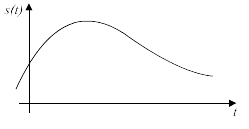 this picture shows what sampling rate is.
How does Colour Depth (Color Depth) or bit depth effect the appearance of an image? Find some images to illustrate the effect.
- The more bit the finer and more colour
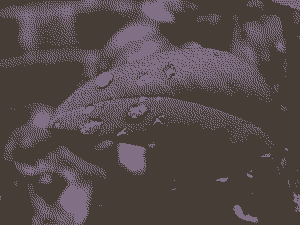 |
| 1 bit |
 |
| 2 bit |
 |
| 4 bit |
 |
| 8 bit |
|
| 24 bit |
Colour depth effects both still and video digital media. Sampling rate only effects video but not still media. Can you explain.
- colour dpeth can change the colour depth for any fram/ picture where sapmling rate is for more than one frame a still media only has one frame
Monday, February 14, 2011
The Drawing Tools In Word
 |
| Step 1 go to insert then press shapes |
 |
| Inssert a sun and use bucket tool to colour |
 |
| Use word art to make heading |
 |
| Put the word on top buy right clicking and pressing order -- bring to front |
 |
| Continue and finish the picture |
Draw Vs. Paint
DRAW
PAINT
- Drawing programs create images composed of objects (eg.squares,shapes).
- The objects can have properties such as colour and line thickness.
- These objects can easily be edited, change shape and colour. move the shapes.
- Drawing programs create vector files.
- WORD
PAINT
- Paint programs create images pixel by pixel (no objects).
- Can't be easily edited.
- Files they create are called bitmapped files.
- PAINT
Wednesday, February 9, 2011
Paint
A paint program is a graphics program that edits bitmapped images.

The tool bar

 |
| Pencil draws images at free hand using a pencil |
 |
| Paint bucket fills on hole space with one colour |
 |
| Eraser simply erases anything you don't want any more |
 |
| Magnafine glass zooms into any part of the screen that you choose |
 |
| Eye dropper will select any colour you have already used |
 |
| Alphabet allows you to type into paint |
 |
| Colour tools alow you to change the colour of your tool/ brush |
 |
Different types of brushes, pens, and markers to draw with. |
 |
| Shapes allow you to make different shapes using a simple tool |
Tuesday, February 8, 2011
Graphic Terms

JPEG: file format commonly used for image compression; An image file in that format
Pixel: The pixel is the smallest addressable screen element, it is the smallest unit of picture which can be controlled.

BMP: image file format used to store bitmap digital images
Flip: Turn into another direction
Video Card: A piece of hardware installed into a personal computer to allow it to send video signals to an external output device such as a monitor or projector
Crop: to cut short/ make smaller

Mirror: duplicating
FPS: Frames Per Second. The amount of still frames that are displayed during one second of video.
Frame: A single image in a sequence
Morph: cause to change shape in a computer animation
CPU: central processing unit
DPI: is an abbreviation for dots (or pixels) per inch, a measure of the resolution of graphic displays
Resolution: the number of pixels per square inch on a computer-generated display; the greater the resolution, the better the picture

File Extension: A file name extension is a suffix to the name of a computer file applied to indicate the encoding convention (file format) of its contents
Compression: compaction: an increase in the density of something
Frame Buffer: a buffer that stores the contents of an image pixel by pixel
Colour Depth: is a computer graphics term describing the number of bits used to represent the color of a single pixel

Subscribe to:
Comments (Atom)